Borrowing
Borrowing on PredMart allows you to unlock the value of your Polymarket outcome shares without selling them. By depositing your shares as collateral, you can borrow USDC from the lending pool — giving you liquid capital while maintaining your prediction market exposure.
This page provides a comprehensive explanation of the entire borrowing lifecycle: depositing collateral, understanding your borrowing power, taking a loan, managing your position, repaying debt, and withdrawing your collateral.
How Borrowing Works: The Big Picture
PredMart's borrowing system follows a straightforward flow:
- Deposit collateral: Transfer your Polymarket shares (CTF tokens) to the lending pool contract.
- Borrow USDC: Request a USDC loan up to your maximum borrowing power, determined by your collateral value and the LTV ratio.
- Use the USDC: Do whatever you want with the borrowed USDC — buy more shares, transfer to another protocol, or hold it.
- Monitor your position: Keep an eye on your health factor. If your collateral price drops, your health factor decreases, and you may need to add more collateral or repay some debt.
- Repay the loan: Return the borrowed USDC (plus accrued interest) to the pool.
- Withdraw collateral: Once your debt is fully repaid (or reduced sufficiently), withdraw your Polymarket shares back to your wallet.
The Meta-Transaction (Relay) System
One of PredMart's unique design features is its meta-transaction relay system for borrows and withdrawals. Unlike simple operations like depositing collateral or repaying debt (which you submit directly to the blockchain), borrowing and withdrawing require oracle-signed price data to calculate your LTV and health factor.
Here's how it works:
-
You sign an intent: Instead of submitting a transaction directly, you sign an EIP-712 typed data message called a "borrow intent" or "withdraw intent." This message contains your wallet address, the token ID, the amount, a nonce (to prevent replay attacks), and a deadline.
-
PredMart relays the transaction: PredMart's backend receives your signed intent, fetches the current midpoint price from Polymarket's CLOB, signs the price data with the oracle key, and submits the full transaction to the blockchain — your signed intent + the oracle-signed price.
-
The contract verifies both signatures: The smart contract verifies (a) that you authorized the borrow via your signature, and (b) that the price data is genuinely from the oracle and is fresh (less than 10 seconds old).
-
You pay no gas: Since PredMart's relayer submits the transaction, it pays the gas fee. You only need to sign a message (which is free).
This relay system is essential because it prevents price manipulation. If users could submit their own price data, they could claim their collateral is worth more than it actually is and borrow excessively. By having the oracle sign the price at relay time, the system ensures that only real, current market prices are used.
Depositing Collateral
What Can Be Used as Collateral?
PredMart accepts any Polymarket outcome share (CTF ERC-1155 token) as collateral. Each outcome token from any Polymarket market can be deposited independently. There is no whitelist of approved tokens — if it's a valid CTF token from Polymarket's contract at 0x4D97DCd97eC945f40cF65F87097ACe5EA0476045, it can be used as collateral.
However, in practice, your borrowing power is limited by several factors:
- The depth gate: Tokens with thin orderbooks have lower borrow caps, which may limit how much you can borrow (see Depth Gate).
- The token's price: Lower-priced tokens have lower LTV ratios, resulting in less borrowing power per dollar of collateral.
- Token freezing: In rare circumstances, the protocol admin may freeze specific tokens (e.g., if a market is suspected of manipulation). Frozen tokens cannot be used as new collateral.
How to Deposit
-
Approve the CTF contract (one-time): Grant PredMart's lending pool permission to transfer your CTF tokens via
setApprovalForAll. This is a one-time approval that covers all token IDs. -
Select a market and token: On PredMart's interface, navigate to the market whose shares you want to deposit.
-
Enter the deposit amount: Specify how many shares you want to deposit.
-
Confirm the transaction: The
depositCollateralfunction is called directly on the blockchain. Your shares are transferred from your wallet to the lending pool contract.
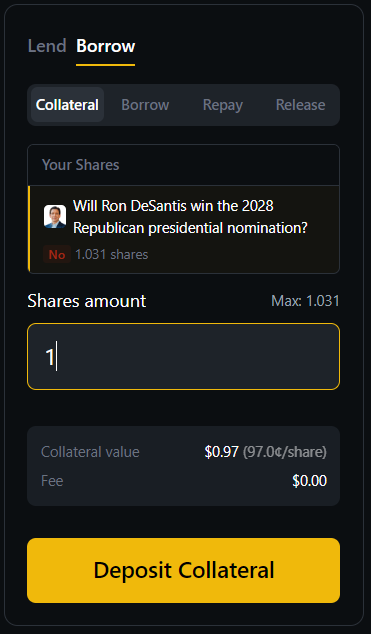
Below is the collateral deposit interface. In this example, the user is depositing 1 share of a "Will Ron DeSantis win the 2028 Republican presidential nomination?" No outcome. The panel shows the collateral value ($0.97 at 97.0 cents per share) and confirms there is no fee for depositing collateral.
Collateral Tracking
Each collateral position is tracked per-user, per-token. If you deposit shares from multiple markets, you have separate positions for each token ID. Each position tracks:
- Collateral amount: The number of shares deposited
- Borrow shares: Your share of the global borrow pool (used to calculate your debt with accrued interest)
- Token ID: The specific Polymarket outcome token
You can add more collateral to an existing position at any time by calling depositCollateral again with the same token ID. The new shares are added to your existing position.
Understanding Your Borrowing Power
The LTV Curve
Your maximum borrowable amount is determined by the Loan-to-Value (LTV) ratio at your collateral's current price. PredMart uses a dynamic, price-dependent LTV curve defined by 7 anchor points:
| Share Price | LTV Ratio | Max Borrow per $1 of Collateral |
|---|---|---|
| $0.00 | 2% | $0.02 |
| $0.10 | 8% | $0.08 |
| $0.20 | 30% | $0.30 |
| $0.40 | 45% | $0.45 |
| $0.60 | 60% | $0.60 |
| $0.80 | 70% | $0.70 |
| $1.00 | 75% | $0.75 |
Between anchor points, the LTV is linearly interpolated. For example, at a price of $0.50, the LTV is interpolated between the $0.40 anchor (45%) and the $0.60 anchor (60%):
LTV(0.50) = 45% + (0.50 - 0.40) / (0.60 - 0.40) × (60% - 45%)
         = 45% + 0.5 × 15%
         = 52.5%
Maximum Borrow Calculation
Your maximum borrow amount is:
Max Borrow = Collateral Amount × Price × LTV(Price) × Borrow Haircut
Where Borrow Haircut is 99.5% (0.995) — a small buffer applied by the backend to avoid edge cases where rounding could cause the transaction to fail.
Example:
- You deposit 10,000 shares
- Current price: $0.70
- LTV at $0.70: interpolated between $0.60 (60%) and $0.80 (70%) = 65%
- Max borrow = 10,000 × $0.70 × 0.65 × 0.995 = $4,527.25 USDC
Additional Borrow Constraints
Even if your LTV calculation allows a certain borrow amount, there are additional constraints that may further limit your borrowing:
-
Pool liquidity: You cannot borrow more than the available USDC in the pool.
-
Per-token borrow cap: Total borrowing against any single token is limited to 5% of the pool's total assets (
poolCapBps = 500). This prevents concentration risk. -
Depth-gated cap: Based on the orderbook depth for the specific token, the oracle may set a lower
maxBorrowlimit. See Depth Gate for details. -
Minimum borrow: The minimum loan size is $1 USDC (
MIN_BORROW = 1e6). -
Price drop guard: If the token's price has dropped by more than 35% (relative) AND more than $0.08 (absolute) within the last 3 minutes, the oracle will refuse to sign borrow transactions. This protects the pool during sudden crashes.
Taking a Loan
Step-by-Step Process
-
Ensure collateral is deposited: You must have collateral deposited before you can borrow.
-
Request a borrow: On the PredMart interface, enter the amount of USDC you wish to borrow.
-
Sign the borrow intent: Your wallet will present an EIP-712 message for you to sign. This message contains:
- Your wallet address (borrower)
- The token ID of your collateral
- The borrow amount
- A nonce (prevents replay attacks)
- A deadline (the intent expires after 5 minutes)
-
PredMart relays the transaction: The backend:
- Receives your signed intent
- Fetches the current midpoint price from Polymarket CLOB
- Checks the price drop guard (blocks during rapid crashes)
- Computes the depth-gated max borrow cap
- Signs the price data with the oracle key
- Submits the transaction:
borrowViaRelay(intent, userSignature, priceData) - Waits for on-chain confirmation
-
USDC is transferred: The smart contract verifies all signatures and constraints, then transfers the borrowed USDC directly to your wallet.
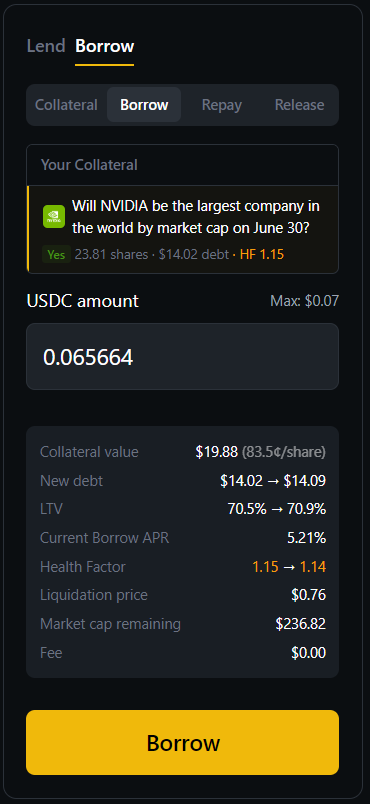
Below is the borrow interface. The user has 23.81 shares deposited as collateral for "Will NVIDIA be the largest company in the world by market cap on June 30?" (Yes outcome) with an existing $14.02 debt and health factor of 1.15. They are borrowing an additional $0.065664 USDC. The panel shows the real-time impact: collateral value ($19.88 at 83.5 cents/share), the new debt ($14.02 to $14.09), LTV change (70.5% to 70.9%), the current borrow APR (5.21%), the health factor change (1.15 to 1.14), the liquidation price ($0.76), and the remaining market cap capacity ($236.82).
What the Contract Checks
When processing a borrow, the smart contract verifies all of the following:
- The protocol is not paused
- The token is not frozen
- The user's signature is valid
- The deadline has not passed
- The nonce is correct (hasn't been used before)
- The oracle's price signature is valid
- The price data is fresh (less than 10 seconds old)
- The price is within valid range (0 to 1, exclusive)
- The resulting debt does not exceed LTV × collateral value
- The borrow amount meets the minimum ($1 USDC)
- The total borrowing for this token does not exceed the pool cap
- The total borrowing does not exceed the oracle's maxBorrow
- There is sufficient liquidity in the pool
If any of these checks fail, the transaction reverts and no USDC is transferred.
Managing Your Position
Debt and Interest
Once you borrow USDC, you owe a debt that grows over time due to interest. The interest rate is determined by the pool's utilization (see Interest Rates).
Your debt is tracked using a borrow shares system. When you borrow, you're assigned a portion of the global borrow shares. Your actual debt at any point in time is:
Your Debt = Your Borrow Shares × Total Borrow Assets / Total Borrow Shares
As interest accrues (increasing Total Borrow Assets), the debt represented by each borrow share increases. This is analogous to how pUSDC vault shares work for lenders, but in reverse — instead of your assets growing, your liabilities grow.
Health Factor
Your health factor is the most important metric to monitor as a borrower. It represents the safety of your position relative to liquidation:
Health Factor = (Collateral Amount × Price × Liquidation Threshold) / Debt
Where Liquidation Threshold = LTV(price) + 10% (the liquidation buffer).
| Health Factor | Status |
|---|---|
| > 1.5 | Healthy — comfortable safety margin |
| 1.0 - 1.5 | Caution — monitor closely |
| < 1.0 | Liquidatable — your position can (and likely will) be liquidated |
| < 0.95 | Fully liquidatable — 100% of your debt can be repaid in a single liquidation |
Example:
- Collateral: 10,000 shares
- Price: $0.70
- LTV at $0.70: 65%
- Liquidation Threshold: 65% + 10% = 75%
- Debt: $4,000
- Health Factor = (10,000 × 0.70 × 0.75) / 4,000 = 5,250 / 4,000 = 1.3125
This position is healthy but should be monitored. If the price drops to $0.58:
- New collateral value: 10,000 × $0.58 = $5,800
- New LTV at $0.58: ~56% (interpolated)
- New liquidation threshold: ~66%
- New health factor: (10,000 × 0.58 × 0.66) / 4,000 = 3,828 / 4,000 = 0.957
- This position is now liquidatable!
How to Improve Your Health Factor
If your health factor is declining, you have several options:
- Add more collateral: Deposit additional shares to increase your collateral value.
- Repay some debt: Return USDC to the pool to reduce your outstanding debt.
- Fully repay: Pay off the entire loan to eliminate liquidation risk entirely.
Repaying Your Loan
How to Repay
- Navigate to your position on PredMart
- Switch to the Repay tab
- Enter the amount of USDC you wish to repay (you can repay partially or in full)
- Confirm the transaction — USDC is transferred from your wallet to the pool, and your borrow shares are burned
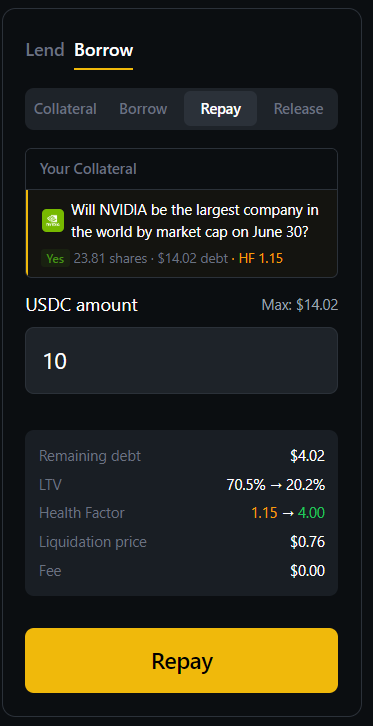
Below is the repay interface. The user is repaying 10 USDC toward their $14.02 debt. The panel shows the impact: remaining debt drops to $4.02, LTV improves dramatically from 70.5% to 20.2%, and the health factor jumps from 1.15 to 4.00 — putting the position well out of liquidation risk.
Repayment Details
- Partial repayment: You can repay any amount up to your total debt. Your borrow shares are reduced proportionally.
- Full repayment: To fully repay, you can pass the maximum uint256 value or your total debt amount. The contract will cap the repayment at your actual debt.
- Interest at repayment: Interest accrues up to the exact second of your repayment transaction. You repay your original borrow plus all accrued interest.
- No prepayment penalty: You can repay at any time with no fees beyond the accrued interest.
Repayment is Direct (No Relay)
Unlike borrowing, repayment is a direct on-chain transaction — you submit it yourself and pay the gas fee. No oracle price is needed because repayment always improves the position's health (less debt = safer).
Withdrawing Collateral
How to Withdraw
After repaying some or all of your debt, you can withdraw your collateral shares:
-
Sign a withdraw intent: Similar to borrowing, withdrawals use the relay system because the contract needs oracle-signed price data to verify that your position remains healthy after the withdrawal. The withdraw intent includes a
toaddress — the destination where your collateral shares will be sent (typically your own wallet, but you can specify any address). -
PredMart relays: The backend fetches the current price, signs it (with
maxBorrowset to 0 so the price cannot be reused for borrowing), and submits the withdrawal transaction. -
Health check: The contract ensures that after removing the collateral, your remaining position (if any) still has a health factor above 1.0.
-
Shares returned: Your Polymarket shares are transferred from the contract to the
toaddress specified in your withdraw intent.
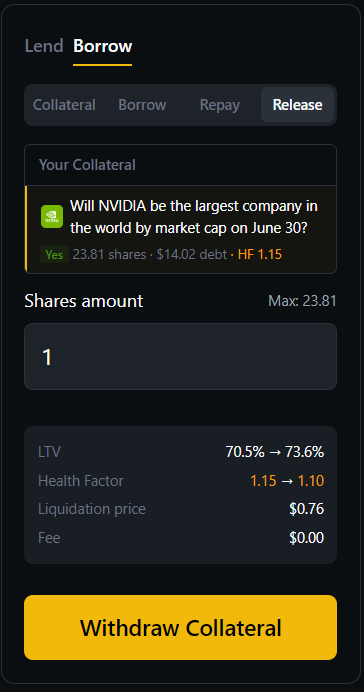
Below is the collateral withdrawal interface. The user is withdrawing 1 share from their position. The panel shows the real-time impact: LTV increases from 70.5% to 73.6%, health factor decreases from 1.15 to 1.10, and the liquidation price remains at $0.76. This preview helps users understand exactly how removing collateral affects their position safety before confirming.
Withdrawal Constraints
- No debt remaining: If you have no debt, you can withdraw all your collateral without any restriction.
- Debt remains: If you still owe debt, you can only withdraw collateral up to the point where your health factor stays above 1.0.
- Token frozen: If the token has been frozen by the admin, collateral cannot be withdrawn (but can still be liquidated and repaid).
Multiple Positions
You can have multiple borrowing positions simultaneously — one for each token ID. Each position is independent:
- Depositing 5,000 shares of Token A and borrowing USDC against it does not affect your ability to deposit 3,000 shares of Token B and borrow against that.
- Each position has its own collateral, debt, and health factor.
- Liquidation of one position does not affect other positions.
This independence is by design — it prevents a price drop in one market from cascading into liquidations across unrelated positions.
Borrowing Fees
PredMart does not charge any upfront borrowing fee. The only cost of borrowing is the interest that accrues on your outstanding debt over time. This interest rate is variable and depends on the pool's utilization (see Interest Rates).
Additionally, the gas fee for borrow and withdraw transactions is paid by PredMart's relayer, making these operations gasless for the user. You only pay gas for direct operations: depositing collateral, repaying debt, and approval transactions.
Common Scenarios
Scenario 1: Simple Borrow and Repay
- Alice deposits 5,000 shares (price: $0.80) → Collateral value: $4,000
- LTV at $0.80: 70% → Max borrow: $4,000 × 0.70 × 0.995 = $2,786
- Alice borrows $2,000 USDC
- Health factor: (5,000 × 0.80 × 0.80) / 2,000 = 1.60 (healthy)
- After 30 days at ~20% APR: Debt is approximately $2,033
- Alice repays $2,033 USDC (original + interest)
- Alice withdraws her 5,000 shares
Scenario 2: Price Drop and Partial Repayment
- Bob deposits 8,000 shares (price: $0.60) → Collateral value: $4,800
- LTV at $0.60: 60% → Max borrow: $4,800 × 0.60 × 0.995 = $2,866
- Bob borrows $2,500 USDC
- Price drops to $0.50 → New collateral value: $4,000
- New LTV at $0.50: 52.5%, Liq Threshold: 62.5%
- Health factor: (8,000 × 0.50 × 0.625) / 2,500 = 1.00 — on the edge!
- Bob repays $500 USDC to bring his debt to $2,000
- New health factor: (8,000 × 0.50 × 0.625) / 2,000 = 1.25 (safe again)
Scenario 3: Adding More Collateral
- Carol deposits 3,000 shares (price: $0.70) and borrows $1,200
- Price drops to $0.55 and health factor approaches 1.0
- Instead of repaying, Carol deposits 2,000 more shares as collateral
- New collateral: 5,000 shares × $0.55 = $2,750
- Health factor improves significantly, position is safe
Next Steps
- Leveraged Trading — Learn how to use borrowed USDC to amplify your positions
- Interest Rates — Understand the interest you'll pay on your loan
- Risk Parameters — Deep dive into LTV, health factor, and liquidation threshold
- Liquidation — What happens when health factor drops below 1.0